The following code can be used to convert the number format into indian currency format (Indian rupees, INR) using PHP.
<?php
ob_start();
//Currency format conversion - Indian Rupee
$n = "1000000";
$len = strlen($n); //lenght of the no
$num = substr($n,$len-3,3); //get the last 3 digits
$n = $n/1000; //omit the last 3 digits already stored in $num
while($n > 0) //loop the process - further get digits 2 by 2
{
$len = strlen($n);
$num = substr($n,$len-2,2).",".$num;
$n = round($n/100);
}
echo "Rs.".$num;
?>
Friday, May 30, 2008

Friday, May 23, 2008
No of days between two dates in php
We can find the no days between two dates using PHP....
There are 2 methods:
1) Split the date and subtract
$date1 = "2008-05-18";
$arr = explode('-',$date1); //split the date
$date2 = $arr[2]; //stores 18
$cur_date = date("d"); // current date
echo "Difference: ";
echo $cur_date-$date2;
2) Convert dates into timestamp, subtract and then convert as we want
$date1 = "2008-04-18";
$to_day = date("Y-m-d"); //current date
$day_diff = (strtotime($to_day)-strtotime($date1))/86400; //60*60*24=86400
echo $day_diff;
//change the divider(864000 to get ur corresponding difference
$hour_difference = (strtotime($to_day)-strtotime($date1))/3600; //60*60=3600
$week_diff = (strtotime($to_day)-strtotime($date1))/604800; //60*60*24*7=604800
There are 2 methods:
1) Split the date and subtract
$date1 = "2008-05-18";
$arr = explode('-',$date1); //split the date
$date2 = $arr[2]; //stores 18
$cur_date = date("d"); // current date
echo "Difference: ";
echo $cur_date-$date2;
2) Convert dates into timestamp, subtract and then convert as we want
$date1 = "2008-04-18";
$to_day = date("Y-m-d"); //current date
$day_diff = (strtotime($to_day)-strtotime($date1))/86400; //60*60*24=86400
echo $day_diff;
//change the divider(864000 to get ur corresponding difference
$hour_difference = (strtotime($to_day)-strtotime($date1))/3600; //60*60=3600
$week_diff = (strtotime($to_day)-strtotime($date1))/604800; //60*60*24*7=604800
Monday, May 19, 2008
Checkbox array problem with Javascript and PHP
Check this solution...
Here we can use the checkbox array.... no problem with both php get data and javascipt validation.
<?php
if(isset($_REQUEST['lang']))
{
$lang=$_REQUEST['lang'];
foreach ($lang as $language)
{
echo "$language is checked <br />";
}
echo "Selected Array: ";
print_r($lang);
}
?>
<html>
<head>
<title>TEST</title>
<script language="javascript">
function chkThis()
{
var chkList = document.chkForm['lang[]'];
for(var i = 0 ; i < chkList.length ; i++)
{
if(chkList[i].checked)
alert(chkList[i].value);
}
}
</script>
</head>
<body>
<form method="post" action="#" name="chkForm" onsubmit="return chkThis();">
Please choose language:<br />
<input type="checkbox" name="lang[]" value="JAVA">JAVA><br />
<input type="checkbox" name="lang[]" value="VB">VB<br />
<input type="checkbox" name="lang[]" value="PHP">PHP<br />
<input type="submit" value="submit" name="submit">
</form>
</body>
</html>
Here we can use the checkbox array.... no problem with both php get data and javascipt validation.
<?php
if(isset($_REQUEST['lang']))
{
$lang=$_REQUEST['lang'];
foreach ($lang as $language)
{
echo "$language is checked <br />";
}
echo "Selected Array: ";
print_r($lang);
}
?>
<html>
<head>
<title>TEST</title>
<script language="javascript">
function chkThis()
{
var chkList = document.chkForm['lang[]'];
for(var i = 0 ; i < chkList.length ; i++)
{
if(chkList[i].checked)
alert(chkList[i].value);
}
}
</script>
</head>
<body>
<form method="post" action="#" name="chkForm" onsubmit="return chkThis();">
Please choose language:<br />
<input type="checkbox" name="lang[]" value="JAVA">JAVA><br />
<input type="checkbox" name="lang[]" value="VB">VB<br />
<input type="checkbox" name="lang[]" value="PHP">PHP<br />
<input type="submit" value="submit" name="submit">
</form>
</body>
</html>
Friday, May 16, 2008
Checkbox validation in Javascirpt
Try this:
Change checkbox values and click button.....
<form name="test">
<input type="checkbox" name="checkgroup" checked />
<input type="checkbox" name="checkgroup" />
<input type="checkbox" name="checkgroup" checked />
<input type="button" value="Button" name="B1" onclick="check_boxes();"></form>
<script type="text/javascript">
function check_boxes()
{
for (i=0; i<document.test.checkgroup.length; i++){
if (document.test.checkgroup[i].checked==true)
alert("Checkbox at index "+i+" is checked!")
}
}
</script>
From: http://www.javascriptkit.com/jsref/checkbox.shtml
Change checkbox values and click button.....
<form name="test">
<input type="checkbox" name="checkgroup" checked />
<input type="checkbox" name="checkgroup" />
<input type="checkbox" name="checkgroup" checked />
<input type="button" value="Button" name="B1" onclick="check_boxes();"></form>
<script type="text/javascript">
function check_boxes()
{
for (i=0; i<document.test.checkgroup.length; i++){
if (document.test.checkgroup[i].checked==true)
alert("Checkbox at index "+i+" is checked!")
}
}
</script>
From: http://www.javascriptkit.com/jsref/checkbox.shtml
Wednesday, May 7, 2008
Changing Max upload file size in php
We can change the maximum file size of uploading in 2 ways.
1) using ini_set()
if you want to set it to 8 MB try: ini_set('max_upload_filesize', 8388608);
and not : ini_set('max_upload_filesize', 8M);
2) or using .htaccess file
in .htaccess file put this line:
php_value upload_max_filesize 8M
php_value post_max_size 8M
1) using ini_set()
if you want to set it to 8 MB try: ini_set('max_upload_filesize', 8388608);
and not : ini_set('max_upload_filesize', 8M);
2) or using .htaccess file
in .htaccess file put this line:
php_value upload_max_filesize 8M
php_value post_max_size 8M
Friday, April 25, 2008
Change the colour of scrollbars using css
This code will change the color or scroll bar of the window:
body {
scrollbar-3dlight-color:#ffd700;
scrollbar-arrow-color:#ff0;
scrollbar-base-color:#ff6347;
scrollbar-darkshadow-color:#ffa500;
scrollbar-face-color:#008080;
scrollbar-highlight-color:#ff69b4;
scrollbar-shadow-color:#f0f
}
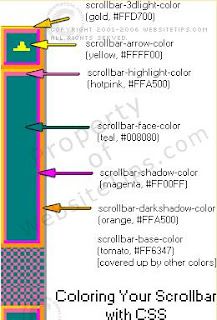
Will work in IE, but not in FF.
From:
http://websitetips.com/articles/css/scrollbars/
body {
scrollbar-3dlight-color:#ffd700;
scrollbar-arrow-color:#ff0;
scrollbar-base-color:#ff6347;
scrollbar-darkshadow-color:#ffa500;
scrollbar-face-color:#008080;
scrollbar-highlight-color:#ff69b4;
scrollbar-shadow-color:#f0f
}

Will work in IE, but not in FF.
From:
http://websitetips.com/articles/css/scrollbars/
Tuesday, April 22, 2008
Use of === and !== operators in PHP
=== (identical)
$a === $b : TRUE if $a is equal to $b, and they are of the same type. (introduced in PHP 4)
!== (Not identical)
$a !== $b : TRUE if $a is not equal to $b, or they are not of the same type.
Example:
<?php
$a = "1"; //String
$b = 1; //Integer
if($a == $b)
echo "Equal<br />";
else
echo "Not Equal<br />";
if($a === $b)
echo "Identical<br />";
else
echo "Not Identical<br />";
?>
Output:
Equal
Not Identical
From: http://in.php.net/manual/en/language.operators.comparison.php
$a === $b : TRUE if $a is equal to $b, and they are of the same type. (introduced in PHP 4)
!== (Not identical)
$a !== $b : TRUE if $a is not equal to $b, or they are not of the same type.
Example:
<?php
$a = "1"; //String
$b = 1; //Integer
if($a == $b)
echo "Equal<br />";
else
echo "Not Equal<br />";
if($a === $b)
echo "Identical<br />";
else
echo "Not Identical<br />";
?>
Output:
Equal
Not Identical
From: http://in.php.net/manual/en/language.operators.comparison.php
Wednesday, April 16, 2008
Changing / Setting Server Timezone in PHP
<?
session_start();
ob_start();
echo '1 '.date("d-m-Y H:i:s"); // Default server time zone
putenv("TZ=Asia/Calcutta"); //change your server time zone - this one is for India - works in PHP 4
// also you can try: date_default_timezone_set('Asia/Shanghai'); - since PHP 5.1.0
echo '2 '.date("d-m-Y H:i:s");
//Reference:
// http://in.php.net/manual/en/function.date.php
// http://in.php.net/manual/en/timezones.php
// http://in.php.net/manual/en/function.date-default-timezone-set.php
?>
session_start();
ob_start();
echo '1 '.date("d-m-Y H:i:s"); // Default server time zone
putenv("TZ=Asia/Calcutta"); //change your server time zone - this one is for India - works in PHP 4
// also you can try: date_default_timezone_set('Asia/Shanghai'); - since PHP 5.1.0
echo '2 '.date("d-m-Y H:i:s");
//Reference:
// http://in.php.net/manual/en/function.date.php
// http://in.php.net/manual/en/timezones.php
// http://in.php.net/manual/en/function.date-default-timezone-set.php
?>
Getting Checkbox Values in PHP
<?php
if(isset($_REQUEST['lang']))
{
$lang=$_REQUEST['lang'];
foreach ($lang as $language)
{
echo "$language is checked <br />";
}
echo "Selected Array: ";
print_r($lang);
}
?>
<html>
<head>
<title>TEST</title>
</head>
<body>
<form method="post" action="#">
Please choose language:<br />
<input type="checkbox" name="lang[]" value="JAVA">JAVA<br />
<input type="checkbox" name="lang[]" value="VB">VB<br />
<input type="checkbox" name="lang[]" value="PHP">PHP<br />
<input type="submit" value="submit" name="submit">
</form>
</body>
</html>
if(isset($_REQUEST['lang']))
{
$lang=$_REQUEST['lang'];
foreach ($lang as $language)
{
echo "$language is checked <br />";
}
echo "Selected Array: ";
print_r($lang);
}
?>
<html>
<head>
<title>TEST</title>
</head>
<body>
<form method="post" action="#">
Please choose language:<br />
<input type="checkbox" name="lang[]" value="JAVA">JAVA<br />
<input type="checkbox" name="lang[]" value="VB">VB<br />
<input type="checkbox" name="lang[]" value="PHP">PHP<br />
<input type="submit" value="submit" name="submit">
</form>
</body>
</html>
Subscribe to:
Posts (Atom)
